Why the ticket is the last chapter of the story, not the first
Most of us know what happens when technology stops working at work. We call IT. We open a service portal, start a chat, or call the help desk. A ticket gets created, someone investigates the problem, fixes it, and we get back to work.
It is such a familiar sequence that we rarely question it. Technology works, something goes wrong, we report it, and IT fixes it.
But is that really how digital work happens?
Think about an ordinary working day. We switch on our laptop, check email, join meetings, open documents, access business applications, search for information, communicate with colleagues, approve requests, create presentations and increasingly interact with AI assistants. We move continuously between devices, applications, networks, cloud services and digital processes.
Behind these ordinary interactions, thousands of digital signals are constantly being generated. Applications launch and respond. Devices consume resources. Networks connect. Authentication succeeds. Meetings begin. Pages load. Processes start and stop. Across an enterprise, these become millions of signals describing how digital work is actually happening.
Most of the time, we never notice any of them. And that is exactly how it should be.
The Productive Work Zone
When technology works well, it almost disappears from our attention. We click and the application opens. We join a meeting and the connection works. We search and find what we need. We submit something and the transaction completes.
We are not thinking about network latency during a customer meeting; we are thinking about the customer. We are not thinking about the operating system while preparing a presentation; we are thinking about the story we are trying to tell. Technology stays in the background while our work stays in the foreground.
I think of this as the Productive Work Zone. It is where all those digital signals quietly come together to allow us to work. Technology does what it was introduced to do: enable the work without becoming the work.
Of course, technology doesn't always stay invisible. Sometimes something goes wrong. And when it goes wrong badly enough, we know what to do.
We contact IT.
The IT Operations Zone
When we cannot log in, an application refuses to open, the VPN will not connect, or something prevents us from completing an important task, we eventually ask for help. We call the service desk, open the support portal or start a chat.
At that moment, our problem becomes visible to IT.
A familiar operational process begins. The issue is recorded, investigated and diagnosed. Someone attempts a fix, perhaps escalates it, eventually resolves it and closes the ticket.
This is the IT Operations Zone. Organizations have spent decades building sophisticated processes, tools and teams to manage this part of the digital workplace.
Put these two zones together and the digital work journey appears remarkably simple.
We work. Something goes wrong. We raise a ticket. IT fixes it.
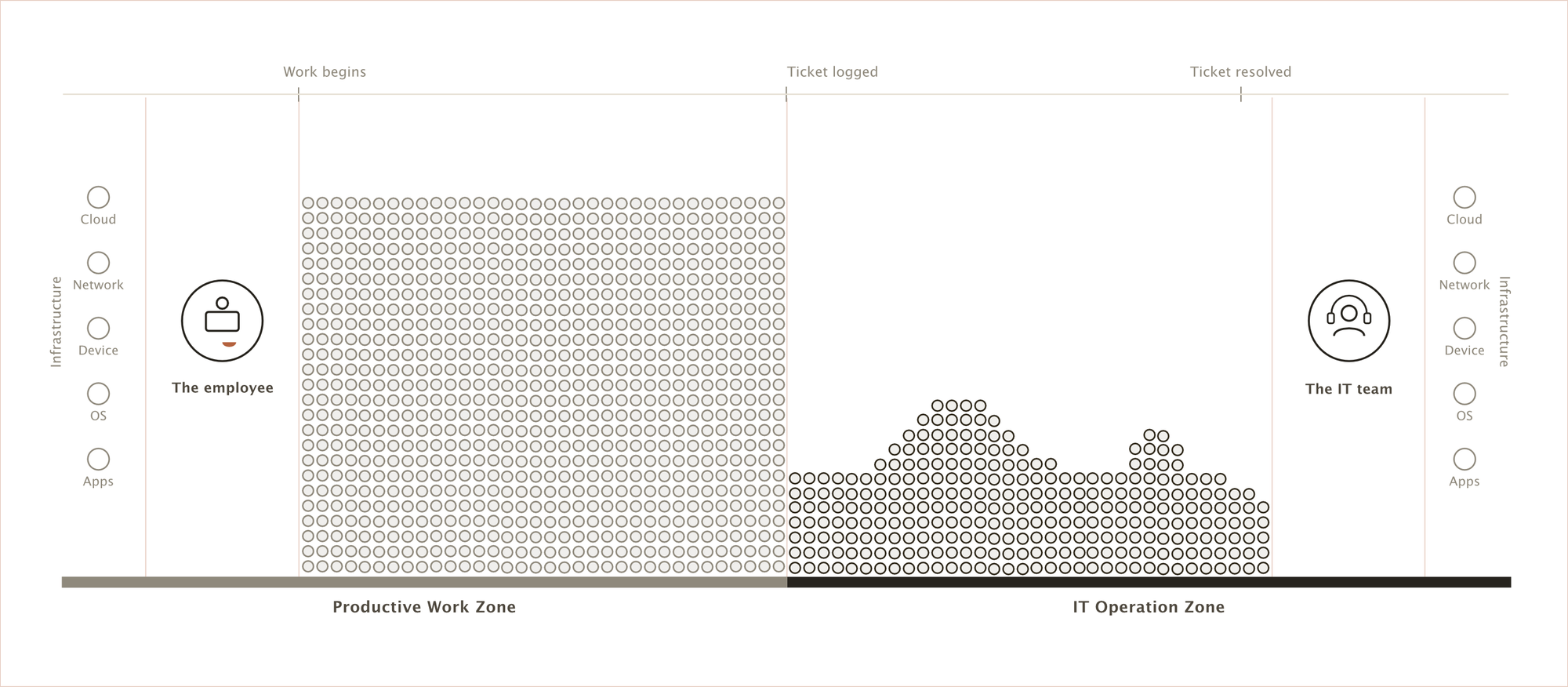
Productive Work → IT Operations.
But is the digital work journey really that simple?
What Happens Before We Call IT?
Think about the last time your laptop was unusually slow. Did you immediately raise a ticket? Probably not.
An application doesn't respond, so we click again. A video call becomes jittery, so we switch off the camera. The Wi-Fi becomes unstable, so we change networks. A browser freezes, so we close it and reopen it. If one of these gets us moving again, we carry on.
Sometimes nothing is technically wrong at all. Three new fields appear in a business application and we don't know what to enter. A new feature is introduced, but we don't understand how to use it. Our organization gives us an AI assistant, but we aren't quite sure what it is good for or how it fits into our work.
The technology may be running. But our work is no longer flowing as it should.
There is clearly something between productive work and the moment we finally call IT.
That something is digital friction.
The Digital Friction Zone
Digital friction is anything in our interaction with technology that introduces unnecessary effort, delay, confusion or interruption into the work we are trying to perform.
Importantly, friction does not always mean that work has stopped. Often, the work continues — but not as it should. It takes longer. It demands more effort. We repeat steps, wait for things, try again, change the way we work or figure out another way forward. The work is still getting done, but some of our time, attention and productivity are already being lost to the technology that was supposed to enable it.
Some of that friction is technical: a slow laptop, an unstable network, a crashing application or a poor video call.
But some of it is human. We may not understand a process, know that a capability exists, know how to use a new feature or understand how to get value from a tool we have been given. Technically, everything may be healthy. Yet something is still standing between us and what we are trying to accomplish.
One is technical digital friction. The other is human digital friction. They may originate differently, but from our perspective the result is the same: something is getting between the digital and the work.
What makes digital friction particularly interesting, though, is what happens next.
Friction Emerges
Friction usually begins quietly. Something that worked seamlessly yesterday takes a little longer today, behaves differently or requires a little more effort from us. It may not be serious enough to stop our work — or even serious enough for us to think of it as a problem.
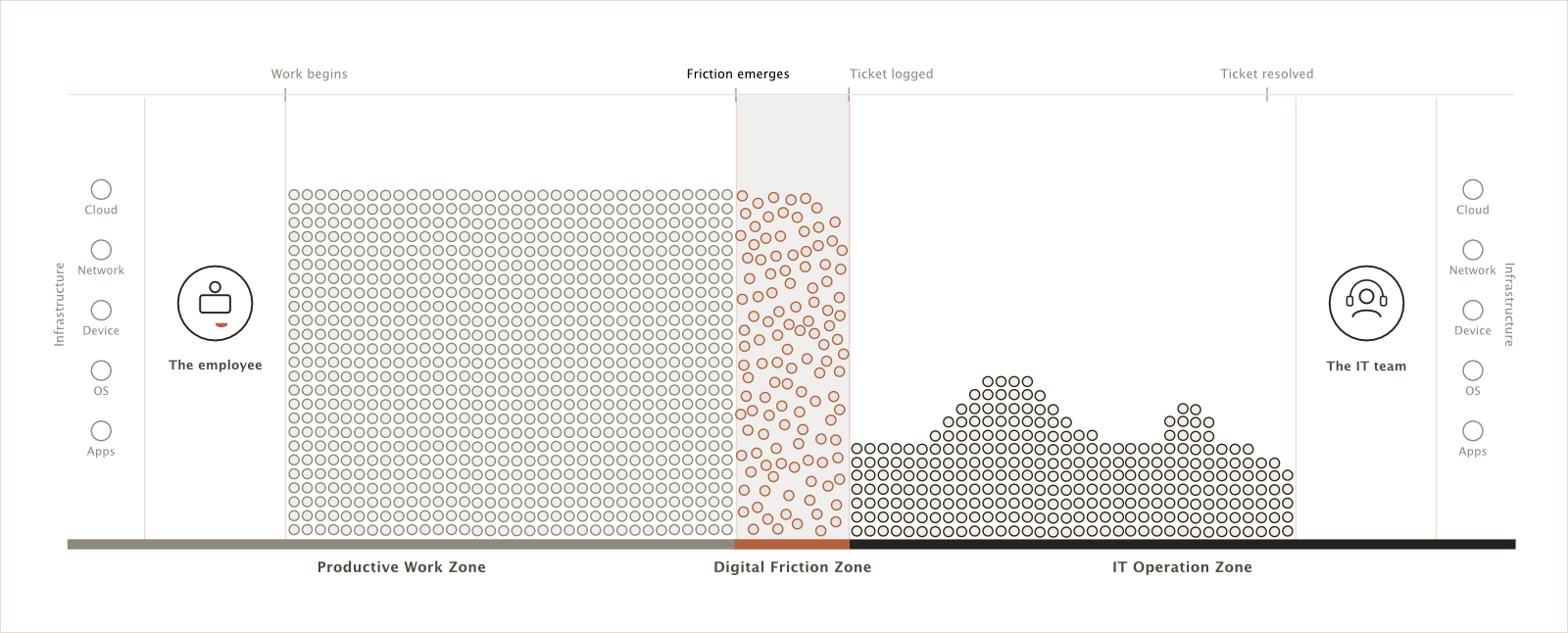
So we continue.
Work is still happening, just not as smoothly as it should.
And when that friction doesn't go away, something very human happens.
We Learn to Live With It
We adapt.
If our laptop takes five minutes to start every morning, we switch it on and go make coffee. If an application only opens after the third attempt, we learn to click it again. If video calls become unstable with the camera on, we leave the camera off.
None of these actions fixes the underlying problem. We have simply adapted ourselves around it.
Eventually, we may stop seeing it as a problem altogether. My laptop is just slow. That application always does that. You have to click it a couple of times.
A technology problem has quietly become part of our behaviour.
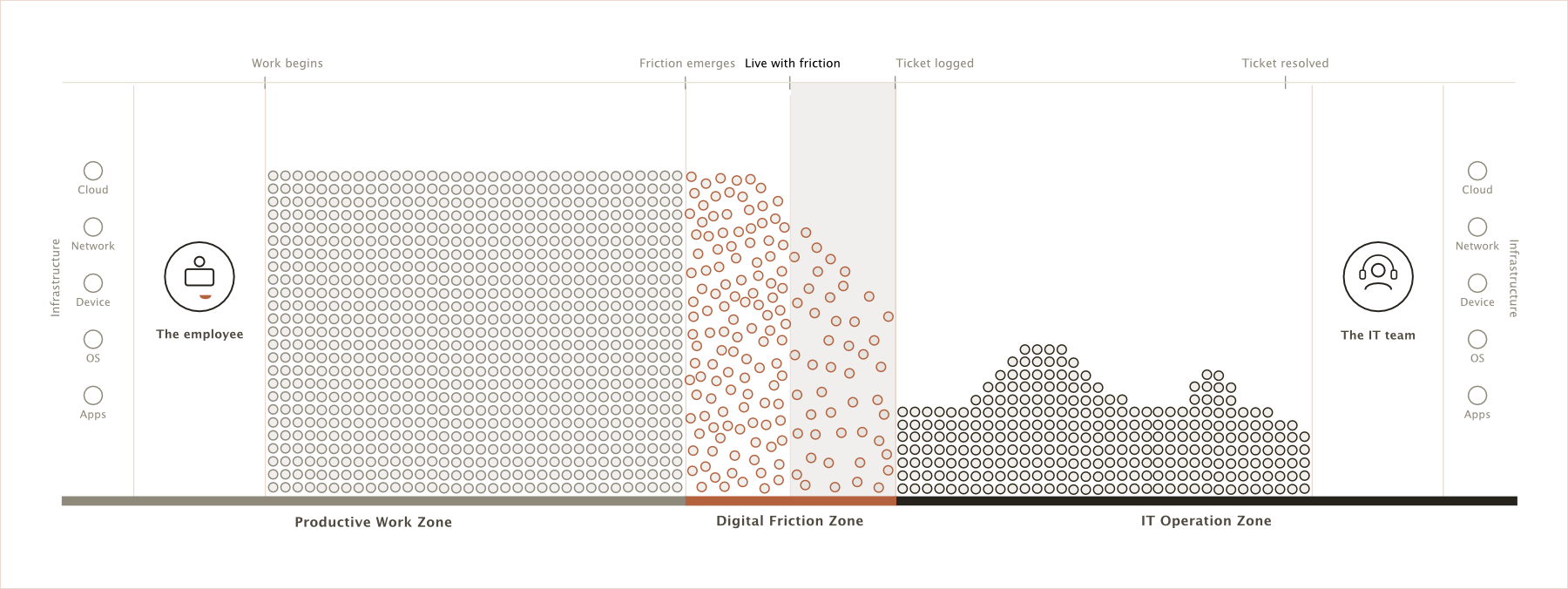
And because we have found a way to continue, we don't raise a ticket. IT may see nothing unusual while we continue paying for the friction through our time, attention and productivity.
Sometimes we live with it. Sometimes we decide there must be another way.
We Find a Workaround
When technology gets between us and something we need to accomplish, our instinct is usually simple: find another way to get the work done.
If one browser doesn't work, we use another. If an application is unreliable, we find an alternative. If the official process is cumbersome, perhaps we create a spreadsheet. If the network is unstable, we switch networks.
We are not necessarily trying to bypass IT. We are trying to finish our work.
This is where digital friction starts doing something more significant. It changes our behaviour.
AI makes this particularly visible. If the AI assistant provided by our organization doesn't give us what we need, we may turn to another one we already know. It works, so we use it again. Soon it becomes part of how we work, perhaps including information or documents the organization never intended to leave its approved environment.
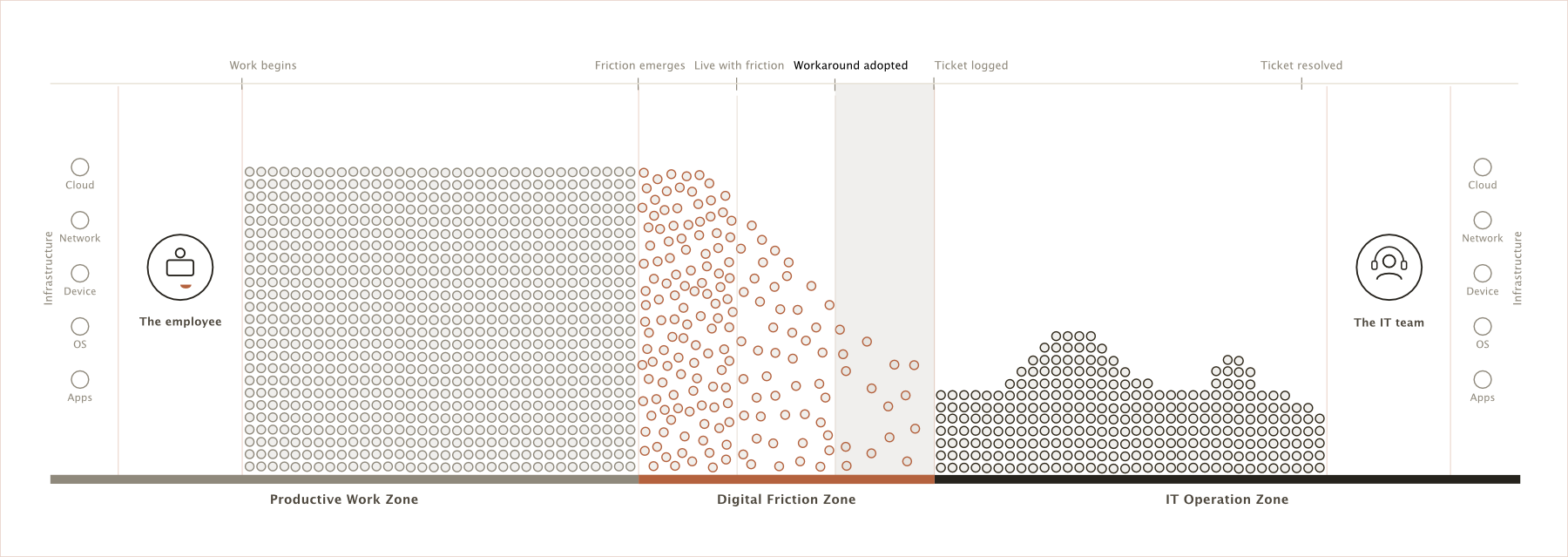
What later appears as shadow IT or shadow AI may therefore have started with something much more ordinary: we encountered friction and found an easier way to get our work done.
And sometimes that workaround serves us well for a long time.
Until it doesn't.
Work Breaks
There is a difference between technology making work difficult and making work impossible.
The application that used to take three attempts to open now doesn't open at all. The laptop that took five minutes to start won't start. The VPN that occasionally disconnected now refuses to connect.
We still try what we know. We retry, restart, reconnect, change browsers, ask a colleague or wait and try again.
But nothing works.
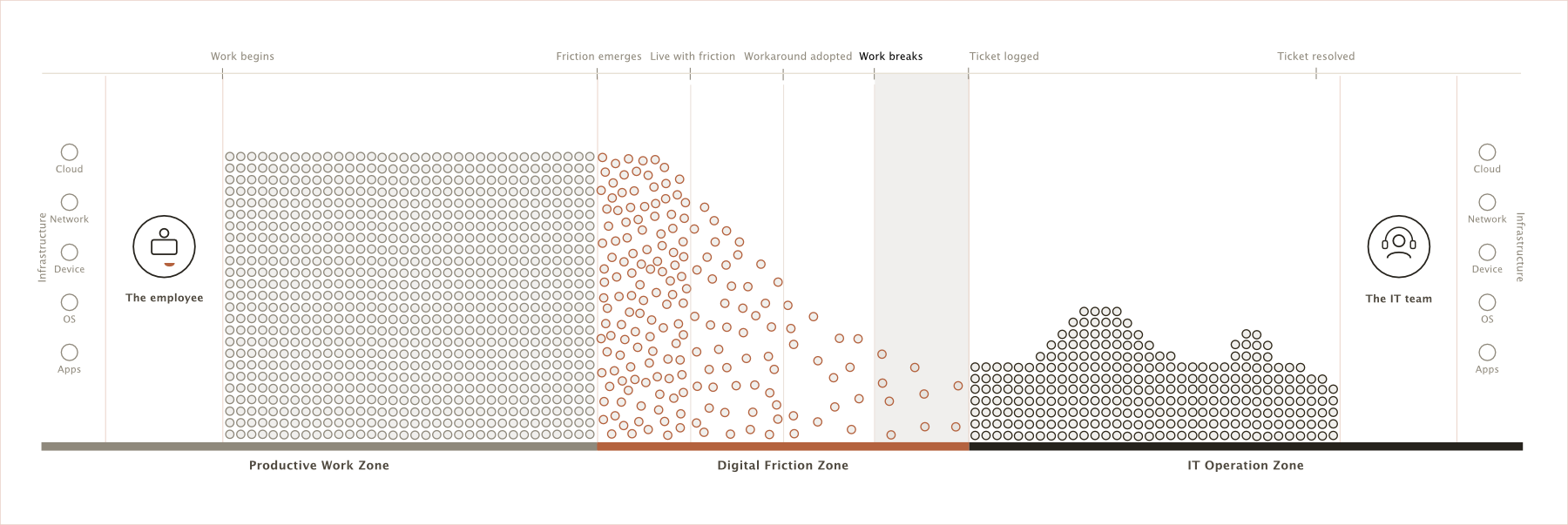
Until this point, technology was adding friction to our work. Now we can no longer continue.
Work has broken.
And only now, after our tolerance and workarounds have been exhausted, do we finally ask IT for help.
We Raise the Ticket
We open the service portal, start a chat or call the help desk. A ticket gets created.
Perhaps the system records the incident at 10:42 AM.
But did the problem really begin at 10:42?
Perhaps we first noticed it last week. Maybe we have restarted the application twelve times since then. Perhaps we lost thirty minutes this morning, changed browsers, asked colleagues for help or found another way to complete the task.
For IT, the problem appeared at 10:42.
For us, 10:42 was simply when we finally told someone about it.
And that distinction reveals two very different versions of the same journey.
IT traditionally sees:
Ticket → Diagnose → Resolve → Close
But we experience:
Work → Friction → Live with it → Work around it → Work breaks → Ticket
The laptop didn't suddenly become slow because we created a ticket. The application didn't begin struggling because we called the service desk. The underlying condition was already there. We were already experiencing it and changing our behaviour around it.
The ticket simply made it visible.
The Three Zones of Digital Work
Once we look at digital work from our perspective as employees, three distinct zones begin to emerge.
We start in the Productive Work Zone, where technology enables us to work and largely stays out of our way.
When something begins interfering with that work, we enter the Digital Friction Zone. The friction may be technical or human. We notice it, tolerate it, adapt to it and sometimes find our own ways around it. Much of this can happen without IT ever knowing.
Eventually, some friction becomes severe enough that work breaks. We ask for help, a ticket gets created and the problem enters the IT Operations Zone, where it becomes visible, managed and resolved.
So the complete digital work journey looks less like:
Productive Work → IT Operations
and much more like:
Productive Work → Digital Friction → IT Operations.
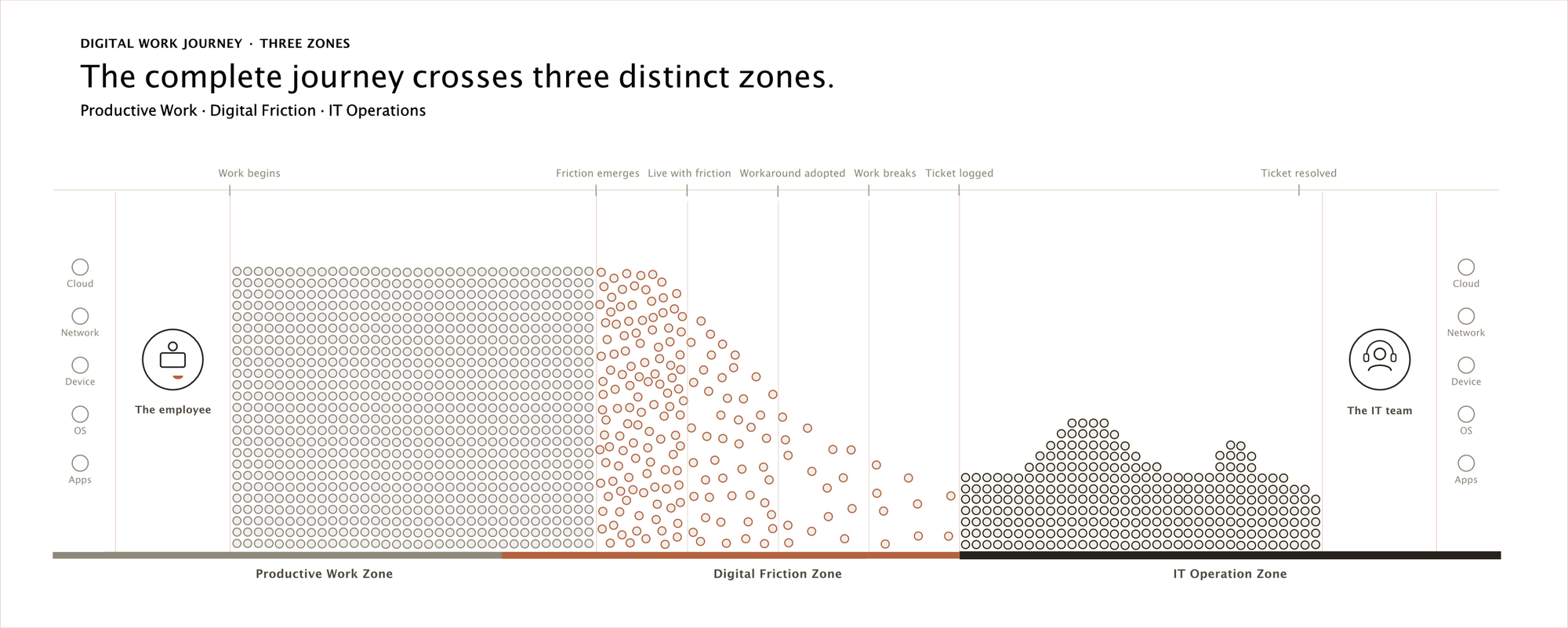
What is interesting is that the Digital Friction Zone isn't new. We have always waited for slow computers, retried applications, restarted devices, asked colleagues for help, avoided confusing features and invented our own ways of getting things done.
It has always been part of digital work.
We just haven't always thought of it as a distinct part of the journey.
And that is why a ticket can tell us only so much. It tells us that someone eventually asked for help. It doesn't tell us how long they struggled before asking, how many others experienced the same thing and never asked, how much time was lost, what workaround was created or how behaviour changed along the way.
A ticket captures an important moment in the digital work journey. But it doesn't capture the whole journey.
Because digital work was happening long before the ticket.
And quite often, so was the problem.
A ticket is not where the story begins. It is simply where one part of the story finally becomes visible.